 VexelRay
Calculator
An ordinary-looking calculator that divides by zero.
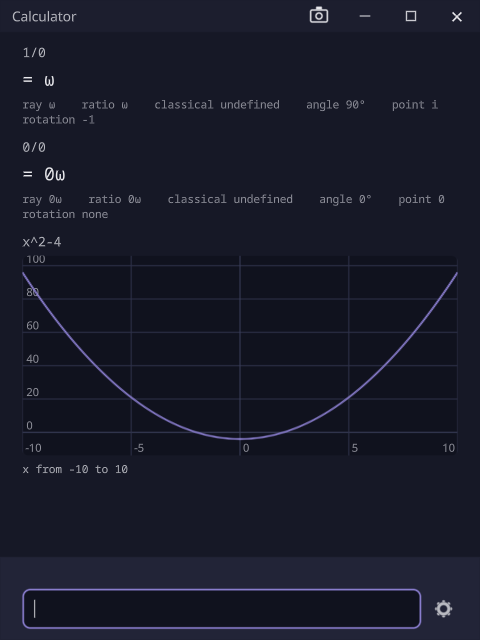
1/0 is Q(1, 0), and 0/0 is Q(0, 0): an answer, not an error. Under it is traction, the number model built
by cott-engine and proven in cott-lean.
An answer is a pair that is never reduced, and the calculator implements only what the proofs cover.
The tape
- Type a line and press Enter. The line, its answer and its readings go on the tape, newest last.
- Every answer says first how much of it is exact, then reads it other ways: the number it stands for, where
there is one, and for a ratio of two whole numbers such as
Q(1, 0)itsray,ratio,angleandclassicalreading (what an ordinary calculator says, which isundefined). An answer that is a double shows its exact value, its hex form and its bits. The cott-engine README says what each one is. - A line with one free variable is plotted:
x^2-4draws its curve, withxfrom −10 to 10. The curve goes through the calculator as it is set, socos,sinande^xplot too. - Definitions are kept: after
x = 1, later lines use it. - Numbers are exact by default. With the Integer number type, decimals are refused, so write
1/2. Type\oforω. - Past lines come back to the entry: Up and Down step through what you typed, and a click on a line adds it to the entry. Holding Ctrl numbers the nine newest lines, and Ctrl with a number puts that answer at the caret.
Settings
The gear beside the entry opens them in a window of their own:
- Number type: Integer (exact, the default), Decimal, or IEEE 64-bit, where
1/0is infinity as in any other calculator. - Size limit: how large a number may be. An Integer over it is refused; a Decimal is rounded, and says so.
- Form: which way a sum and a product nest when they meet. Both forms hold the same value.
- Recursion limits: how far the steps behind
cosandsinmay go. Each limit is a count of steps, not a time, so a line gives the same answer on every machine; a line that needs more is refused, not cut short.
A change applies to the lines entered after it. Lines already on the tape keep their answers, and definitions carry over.
With the rest of the suite
Installing adds calculator to your PATH, so calculator in a MainFrame tab opens one. It does not
open files, so the other applications have nothing to hand it.
Status
Evaluation, readings, plots and the settings work. It is part of the 0.1.0 prerelease.